The traceroute command traces the network path of Internet routers that packets take as they are forwarded from your computer to a destination address. The “length” of the network connection is indicated by the number of Internet routers in the traceroute path.
Traceroutes can be useful to diagnose slow network connections. For example, if you can usually reach an Internet site but it is slow today, then a traceroute to that site should show you one or more hops with either long times or marked with “*” indicating the time was really long. If so, the blockage could be anywhere from your Internet service provider to a backbone provider, and there is likely little you can do except wait with the infinite patience of the mighty oak.
The subsections below describe operating system traceroute versions, traceroute websites, lists of traceroute information sites, and the original version of the traceroute program.
Traceroute operating systems. On a Windows computer, you can run a traceroute in an MSDOS or Command window by typing “tracert” followed by the domain name, for example as in “tracert www.yahoo.com” shown in the picture below.
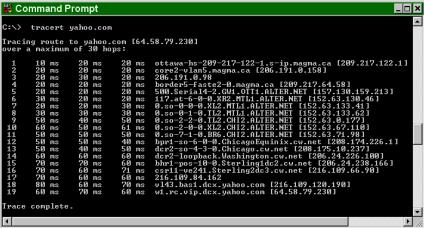
You can list the tracert options with the command “tracert -?”.
Online traceroute. The following websites provide an online traceroute function:
Remember when doing an online traceroute that the test is done from the website, so the times reflect the Internet path from that location and not from your computer. However, an online traceroute is still useful to test the speed and length of network communications to an address from various locations around the Internet. If the times returned by several online traceroutes to a given address are consistently long, then the destination’s network is likely having problems. However, if the times are relatively fast from most locations but not from your system, then then there is likely some blockage in the network between you and them, likely in your network.
Lists. The following sites provide lists of sites that provide online traceroute services:
Unix Version. Like most Internet utilities, the traceroute command was originally invented for Unix computers. The options for the original Unix traceroute command line version are shown below:
traceroute [-m #] [-q #] [-w #] [-p #] {IP_address|host_name}
|
Option |
Definition |
|
-m |
Set the maximum Time To Live (TTL) for the trace, measured as the number of hosts the program will trace before ending, default of 30 |
|
-q |
Set the number of UDP packets to send for each setting, default of 3. |
|
-w |
Set the amount of seconds to wait for an answer from each host before giving up, default of 5 |
|
-p |
Specify the other host’s invalid port address, default of 33434 |