You can multiply your surfing fun by browsing more than one web page at the same time.
If you are an Internet power surfer, then you might find it useful to open more than one web page at once so you can perform different actions on different pages and switch between them as you wish. For example, you can search for different things in different pages, search in one page and surf in another, explore one site on one page and a related site on another page, track the news in one page and type in a chat room in another, or simply switch to a more responsive page while waiting for a slow page to load.
There are two effective methods of managing multiple pages: creating new windows which works with any browser; and tabbed browsing that provides significantly improved browser usability for those browsers that support it.
New window. With almost any browser you can open a new window with the command <ctrl>-n or the menu item “File / New Window”. You can then quickly stagger new pages for easy access as you open them in two steps:
- Top left. Line up the top left corner of the new window with the previous windows so they more or less line up at the same spot.
- Bottom right. Pull the bottom right corner of the new window so that it is staggered above the previous windows as shown in the picture below.
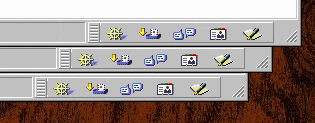 |
This arrangement ensures that no window can ever get completely covered by the other windows, and you will always be able to select any window at any time in one action by simply clicking on the bottom right corner of the window you wish to switch to.
With several windows open you can perform advanced web navigation, such as searching for different things in different windows, search in one window and surf in another, use one window to explore one site and another site in a second window, or use one window to track the news while you type in a chat room in another window.
Tabbed browsing. Browsers that support tabbed browsing enable you to open several web pages in the window at once, all instantly accessible through tabs. This simple functionality provides a powerful increase in web surfing usability, and can quickly become indispensable. The advantages are several:
- No set-up. You don’t have to incur the set-up time of the staggered window approach, which must be repeated for each new window you add.
- Scalability. You can conveniently manage a large number of pages at a time with this approach, since a new page is simply another tab. Depending on the width of the window, you can open many as many as a dozen pages or more and still see some title text on each tab.
- One-click action. Mozilla provides the option to open a new tab for a link under the right-click menu. But that is three actions — right-click on the link, scroll to the option, and then release the mouse. Of course we don’t have time for that. Under the Preferences / Navigation / Tabbed Browsing option you can assign the open tab action to several commands, including middle-click. If you have a mouse with three buttons, or a clickable wheel to which you can assign the middle button functionality, then you can activate this option and open new links in new tabs with a single middle-click of your mouse, instantly.
- Breadth-first browsing. With Mozilla you can set an option under Preferences / Navigation / Tabbed Browsing called “Load links in the background”, which opens a new page as a background tab without replacing the current page. This means you can continue to read the original page and continue to click on links you want to read later as you come across them without losing the page. In structural terms, this for the first time enables breadth-first browsing, as opposed to depth search browsing where you click on a link, visit and read the page, and then return to the original page to repeat with the next link. Previous to this tabbed browsing feature, the only way to approximate breadth-first browsing was to open each link in a new window — a feature most browsers provided as a right-click menu item, but was less convenient than tabbed browsing with multiple windows springing up all over the screen.
Tabbed History. The first browser to offer tabbed browsing was InternetWorks, created by Booklink Inc., and winner of the Comdex show’s Rookie of the Year Award in 1994. The program was renamed GNNworks the following year when it was bought by AOL and incorporated in their online client. (The same development team then went on to develop AOL’s Instant Messenger application.)
The next known browser with what it called “dynamic browser tabs” was Simulbrowse, later called NetCaptor, released by Adam Stiles on January 3, 1998. The Amiga browser IBrowse introduced tabbed browsing in 1999. The browser Opera V4 introduced tabbed browsing in 2000 (Opera had earlier introduced the multiple document interface enabling cascading and tiling of browser windows).
For some reason Internet Explorer and other browsers did not immediately appreciate this innovation, and the next known browser to offer tabbed browsing was Mozilla in 2003, followed by Apple’s Safari. However, once it became a discriminator, everyone had to have it, and by 2005 most browsers supported tabbed windows of some kind.
(Please let the author of this site know if you know of other early browsers before 2000 that support tabbed browsing.)